


Read about connecting to Engage
Configuration
Configuring a generic API integration is done in the Onsite manager. Follow these steps:- Log into the Onsite manager, then go to Configuration and Sites.
- Pick the site you want to set up the generic API integration for and either click on its name or select “Edit” in the three-dots menu.
- You should now be in General settings for that site. Scroll down to Integrations, locate the option Generic and click to expand it.
- You’ll now see the configuration for the generic API integration.
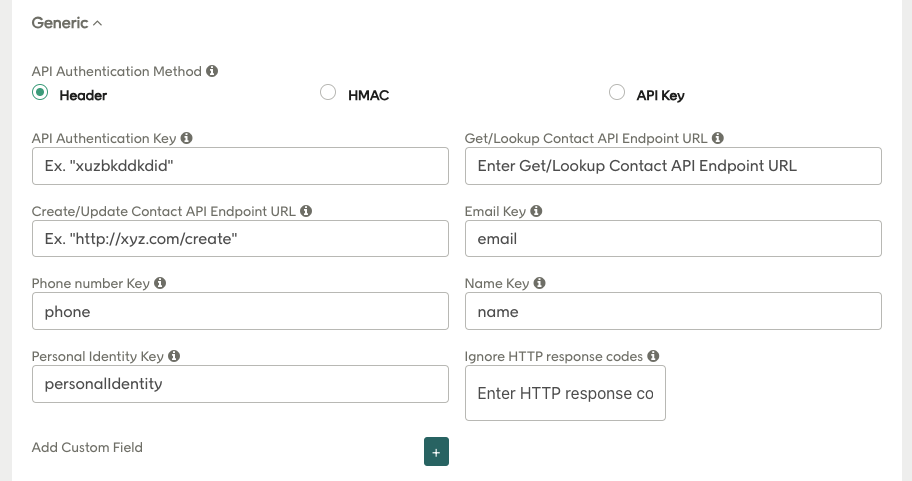
- Header
- HMAC
- API Key
- Get/Lookup Contact API Endpoint URL: The URL for your API endpoint that will be used to check if a contact already exists.
- Create/Update Contact API Endpoint URL: The URL for your API endpoint that will be used for creating new contacts and updating existing contacts with new data, consents, and so on.
- Email Key: The variable name to be used for email address in API requests.
- Phone number Key: The variable name to be used for mobile phone number in API requests.
- Name Key: The variable name to be used for customer name (full name) in API requests.
- Personal Identity Key: The variable name to be used for social security number (personal number in Sweden, for example) in requests to your API.
- Ignore HTTP response codes: Here you list the HTTP error codes to ignore, which means no error will be logged if any of the listed response codes are received. Use this feature to ensure everything still functions in the case of the API responding with error codes. If this setting is not active, and an unexpected response code is returned from the API, the user flow will be blocked and/or aborted.
The data
The same JSON structure is used for sending and receiving data (via POST and GET respectively). The fields in the JSON are determined by what the campaign is configured to collect:Sending and receiving Onsite data
customoption might be “pet” and customoptionvalue1 might be “Dog”. You should configure the API to ignore anything that you don’t recognize and/or can’t handle. This is fully configurable and maps directly into what is collected from the user.
There is one special field redeal to tag the type of contact, which is used for conversion tracking. You can choose to store this or just ignore it. The current tags in use are:
- NewAmbassador: A new contact who acted as an ambassador by referring friends
- NewFriend: A new contact from a friend referral
- NewSignup: A new contact without a referral
- ExistingAmbassador: An existing contact who acted as an ambassador
- ExistingFriend: An existing contact who acted as a friend
- ConvertedAmbassador: A contact acting as an ambassador who has converted
- ConvertedFriend: A contact acting as a friend who has converted
Receiving data
The API call to fetch data is:- 200 OK
- 404 Not found
Sending data
The API call used to send data is one of the following:- 200 OK
- 201 Created