Rewarding your customers always pays off. For this, Engage has a Promotions module. There are several kinds of promotions available in Engage but the kind you can interact with via the Engage API are multichannel promotions so these are the main focus here.

About multichannel promotions

A multichannel promotion is a promotion that can be set up to be redeemed in-store or online or both ways. These promotions can be assigned to a contact based on their previous purchases or on any other type of contact data or interaction. You can assign multichannel promotions to segments as well as to single contacts in Engage. For this reason they’re also known as personal offers. In-store the contact is identified at the POS and all their active multichannel promotions are fetched from Engage and are ready to use. Online the customer will also need to identify themselves at some point in the flow, either by logging in, or when they fill in their details at the checkout. Then all available multichannel promotions can be fetched from Engage and shown. How exactly this is done will depend on how the e-com has been set up.

Setting up a multichannel promotion in Engage
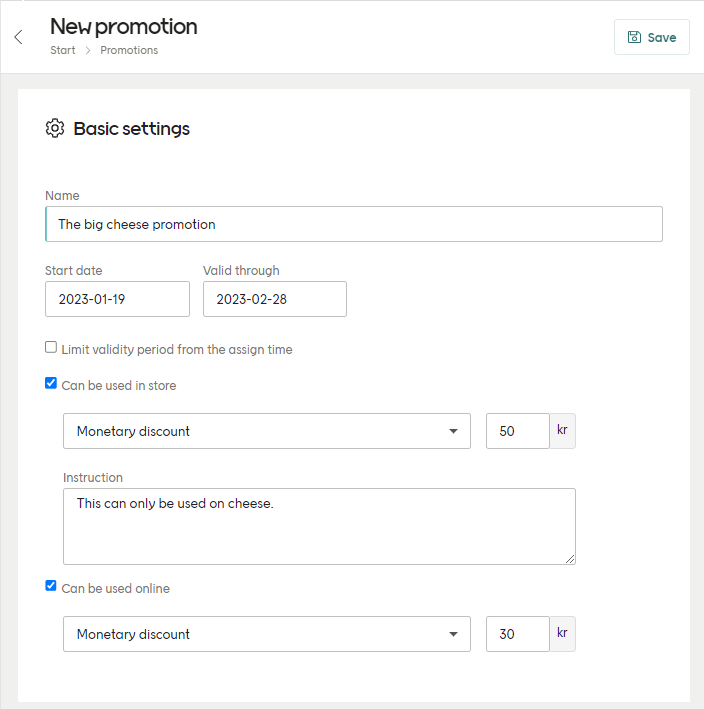
Setting up a multichannel promotion in Engage
https://mintcdn.com/voyado/-QD3xMpfEY3BtcMt/icons/help-center-link.png?fit=max&auto=format&n=-QD3xMpfEY3BtcMt&q=85&s=d9dbad90df6f1f0afa4f2062b8d9c460

Learn about setting up multichannel promotions

Value types

When setting up your multichannel promotion you’ll need to select the type from the dropdown. You can use different values for “Can be used in store” and “Can be used online” in the same promotion. The options available are:
  • Monetary discount
  • Discount in percent
  • Manual instruction (only for in-store POS)
  • External promotion code
In the value type “External promotion code” the actual price rule is not stored in the promotion itself but in the retailer’s system (such as ERP or e-com platform). When this kind of promotion is displayed, the POS looks up the relevant price rule using the external promotion code and then displays those details. Staff or customers, however, will not notice this happening.

Get promotions for contact

This endpoint is used to fetch all available promotions assigned to a contact:
GET /api/v3/promotion-assignments
contactId
int
required
The contact’s unique ID sent in the query string. If you have some other contact identifier, use this endpoint to get the contactId to use in this request.
redemptionChannelType
string
“ECOM”, “POS” or “OTHER”. If left out, all promotions will be returned.
An example request will then look like this:
GET /api/v3/promotion-assignments?contactId=67ea5555-0e09-484f-b4c4-aa3e00e1e24c&redemptionChannelType=ECOM
[
  {
    "id": "a08c6a49-41b1-4f04-978f-adce009e081a",
    "promotionId": "5b64c747-0594-41d0-bb14-330fb48131ad",
    "externalId": 123214-413434-413443,
    "type": "Multichannel",
    "name": "3 for 2 Jeans",
    "expiresOn": "2024-09-23T08:58:15.034Z",
    "heading": null,
    "description": null,
    "redeemed": false,
    "redeemedOn": null,
    "imageUrl": null,
    "link": null,
    "redemptionChannels": [
      {
        "type": "ECOM",
        "valueType": "EXTERNALOFFER",
        "value": "DISCOUNTCODE",
        "instruction": "This is just an instruction"
      }
    ]
  },
  {
    "id": "594d98e1-ef73-40e3-9799-add400eaab05",
    "promotionId": "f1ad86ae-f6b2-48a1-be13-28bdae59580b",
    "externalId": null,
    "type": "Multichannel",
    "name": "20% off t-shirts",
    "expiresOn": "2023-11-02T23:59:59+01:00",
    "heading": "You get a discount!",
    "description": "Hope you will enjoy this gift. ",
    "redeemed": false,
    "redeemedOn": null,
    "imageUrl": "https://images.eclub.se/images/voyadodemoeng/64DC1720689E4F5A0E1EAD92F3E9A6AFC0863D18.jpg",
    "link": "https://www.shop.com/sv-se/man/t-shirts/mfavouritetee-901-s-21350901003",
    "redemptionChannels": [
      {
        "type": "POS",
        "valueType": "PERCENT",
        "value": 20,
        "instruction": null
      }
    ]
  },
  {
    "id": "3cb87804-6b3b-4f24-a15a-ae8a00e0eacf",
    "promotionId": "f1ad86ae-f6b2-48a1-be66-28bdae59580b",
    "externalId": null,
    "type": "Multichannel",
    "name": "Monetary discount 10€",
    "expiresOn": "2022-05-15T23:59:59+02:00",
    "heading": null,
    "description": null,
    "redeemed": true,
    "redeemedOn": "2022-05-03T13:39:49+02:00",
    "imageUrl": null,
    "link": null,
    "redemptionChannels": [
      {
        "type": "POS",
        "valueType": "MONEY",
        "value": {
            "currency": "EUR",
            "amount": 10
        },
        "instruction": null
      }
    ]
  }
]
A request to this endpoint will only return those promotions where the assigned promotion AND the main promotion are active, with a start date that is not in the future. This query will not filter out redeemed promotions as long as they otherwise fulfill the criteria for being active.

Redemption channels

The object redemptionChannels in the response specifies if a promotion is a percentage, a monetary amount to be withdrawn from the total amount of the transaction, or an external discount code that refers to a price rule in your platform.
[
  {
    ...
    "redemptionChannels": [
      {
        "type": "POS",
        "valueType": "MONEY",
        "value": {
            "currency": "EUR",
            "amount": 10
        },
        "instruction": null
      }
    ]
  }
  ...
]
redemptionChannels.type declares which channel the promotion applies to. redemptionChannels.valueType declares which type of discount we want to assign (percentage, monetary or external code). redemptionChannels.value is the percentage, monetary amount or the external code referring to the external price rule. With a monetary discount we also expose the group currency set in Engage for the specific client. redemptionChannels.instruction is an instruction that can be added to the promotion by the Engage user to, for example, give some information to store staff regarding the promotion. These can be displayed in all currencies declared in your Engage environment.
"redemptionChannels": [
    {
        "type": "POS",
        "valueType": "PERCENT",
        "value": 15,
        "instruction": "POS instructions."
    }
]
"redemptionChannels": [
    {
        "type": "ECOM",
        "valueType": "EXTERNALOFFER",
        "value": "DISCOUNTCODE",
        "instruction": "POS instructions."
    }
]
"redemptionChannels": [
    {
        "type": "POS",
        "valueType": "MONEY",
        "value": {
            "currency": "EUR",
            "amount": 10
        }
    }    
]

Assign a promotion

Promotions can be assigned to contacts either though a file import, manually in the Engage UI, or by using this API endpoint:
POST /api/v3/promotion-assignments
With the following kind of payload:
{
    "contactId": "e0e63d15-1881-4f9a-9ce1-94c3e21c6f47",
    "promotionId": "132aa326-fa89-4a8b-af9f-0b232157f8a2"
}
If your request has been successful, you’ll get a HTTP 200 OK response. Otherwise you’ll get one of these:
  • 400: InvalidContactId, InvalidPromotionId
  • 404: ContactNotFound, PromotionNotFound

Redeem a promotion

When getting a contact’s promotion data, you’ll get back something like this:
[
  {
    "id": "bb247ef7-80bb-440c-beb7-ab4172e56666",
    "promotionId": "1a50b7aa-d697-4dc6-3ce7-ab2c00b3a920",
    "externalId": "SO-14034",
    "type": "Multichannel",
     ...
    "redemptionChannels": [
      {
        "type": "POS",
        "valueType": "EXTERNALOFFER",
        "value": "10056",
        "instruction": null
      },
      {
        "type": "ECOM",
        "valueType": "EXTERNALOFFER",
        "value": "10056",
        "instruction": null
      }
    ]
  }
]
Note that several IDs are mentioned here:
  • promotionId - This is the main ID of the promotion (the “template” this promotion was created from). Several users can have the same value for this, since it just refers to the main promotion. This CAN’T be used to redeem a promotion for a specific contact.
  • id - This identifies a specific “instance” of the promotion that was created from the “template” that was identified by promotionId. The id value is unique to that contact and is the one used when redeeming this promotion for them.
  • externalId - This value exists when the promotion has been created over the API. If the promotion was created manually in the Engage UI, this is null. It is not important when redeeming the promotion.
The value returned as id is the promotion instance ID and this is what you must use to redeem a promotion.

How to redeem

A promotion is redeemed for a contact using the promotion’s unique ID and the redemption channel, which is either:
  • “POS”
  • “ECOM”
Since a promotion’s ID is always connected to a unique contact, the contact’s details do not have to be used.
To redeem the promotion, use this endpoint:
POST /api/v3/promotion-assignments/{id}/redeem
You’ll also send a request payload with the redemption channel:
{  
   "redemptionChannel": "ECOM" 
}
After 4.5 seconds this endpoint will time out, provided it has not already saved the promotion as redeemed. If the promotion has been redeemed (this is also known as the “point of no return”) when the 4.5 seconds limit is passed, the request will be processed until completion. It is recommended to not have a timeout shorter than 60 seconds, in order to avoid situations where a promotion is redeemed in Engage but the calling system does not know it due to aborting the request.

Redemption response codes

If the request has been successful, you’ll get a HTTP 200 OK response. Otherwise you’ll get one of these:
  • 400: NotAValidRedemptionChannel, InvalidPromotionIdNoData
  • 404: PromotionNotFound, PromotionNotAssociatedWithContact
  • 409: PromotionNotValidForRedemptionChannel, PromotionAlreadyRedeemed, PromotionAlreadyRedeemed
  • 504: GatewayTimeout

Create a promotion

Creation of a multichannel promotion can be done in three ways:
  1. In the Engage UI
  2. Over the Engage API
  3. By an XML file import
In this section we’ll consider creating a multichannel promotions via the Engage API.
A new promotion is created in Engage as a draft. It must then be activated so that it can be assigned to individual contacts. This assignment must be manually done in the Engage UI.
Create a draft promotion using the following endpoint:
POST /api/v3/promotions/multichannels
You can create a promotion in two ways:
  • By giving a start date and a validity time
  • By giving a start date and an end date
When sending in the startDate or endDate send only the year, month and day as in the examples shown below. Specific times in a day cannot be used.
Here is what such a request looks like:
{
  "externalId": "externalIdentifier",
  "name": "Example promotion name",
  "validity": {
    "startDate": "2020-03-18",
    "assignedValidity": {
      "unit": "Months",
      "amount": 3
    }
  },
  "presentation": {
    "heading": "Example heading",
    "description": "Example description",
    "link": "http://www.example.com"
  },
  "redemptionChannels": [
    {
      "type": "POS",
      "valueType": "EXTERNALOFFER",
      "value": "POS-CAMPAIGN-123",
      "instruction": "Example POS instruction"
    },
    {
      "type": "ECOM",
      "valueType": "EXTERNALOFFER",
      "value": "ECOM-CAMPAIGN-1337"
    }
  ]
}
Here is a successful response, containing the promotion’s ID:
{
  "id": "9125f018-1838-4f65-929d-87f0b4353661",
  "status": "Draft",
  "externalId": "externalIdentifier",
  "name": "Example promotion ame",
  "validity": {
    "startDate": "2020-03-18T00:00:00+02:00",
    "assignedValidity": {
      "unit": "Months",
      "amount": 3
    }
  },
 "presentation": {
    "heading": "Example heading",
    "description": "Example description",
    "link": "http://www.example.com"
  },
  "redemptionChannels": [
    {
      "type": "POS",
      "valueType": "EXTERNALOFFER",
      "value": "POS-CAMPAIGN-123",
      "instruction": "Example POS instruction"
    },
    {
      "type": "ECOM",
      "valueType": "EXTERNALOFFER",
      "value": "ECOM-CAMPAIGN-1337"
    }
  ]
}
The value id here is the ID for the promotion definition. This is used to assign this promotion to individual contacts. Each assignment gets its own ID, connecting this promotion and contact.
Here is what such a request looks like:
{
  "externalId": "externalIdentifier",
  "name": "Example promotion name",
  "validity": {
    "startDate": "2020-03-18",
    "endDate": "2020-06-18",
  },
  "presentation": {
    "heading": "Example heading",
    "description": "Example description",
    "link": "http://www.example.com"
  },
  "redemptionChannels": [
    {
      "type": "POS",
      "valueType": "EXTERNALOFFER",
      "value": "POS-CAMPAIGN-123",
      "instruction": "Example POS instruction"
    },
    {
      "type": "ECOM",
      "valueType": "EXTERNALOFFER",
      "value": "ECOM-CAMPAIGN-1337"
    }
  ]
}
Here is a successful response, containing the promotion’s ID:
{
  "id": "9125f018-1838-4f65-929d-87f0b4353661",
  "status": "Draft",
  "externalId": "externalIdentifier",
  "name": "Promotion Name",
  "validity": {
    "startDate": "2020-03-18T00:00:00+02:00",
    "endDate": "2020-06-18T23:59:59+02:00",
    "assignedValidity": null
  },
  "presentation": {
    "heading": "Promotion presentation title",
    "description": "Promotion presentation description",
    "link": "http://www.example.com"
  },
  "redemptionChannels": [
    {
      "type": "POS",
      "valueType": "EXTERNALOFFER",
      "value": "POS-CAMPAIGN-123"
    },
    {
      "type": "ECOM",
      "valueType": "EXTERNALOFFER",
      "value": "ECOM-CAMPAIGN-1337"
    }
  ]
}
The maximum value for end date is “9999-12-30”.
If your creation request has been successful, you’ll get a HTTP 200 OK response. Otherwise you’ll get one of these:
  • 400: BadRequest
  • 500: Error

Update a promotion

You can update (alter) a multichannel promotions over the Engage API.
Only draft promotions can be updated, not active promotions.
You can update the entire promotion or only its validity. Each method uses a different API endpoint:
To update the entire multichannel promotion, used this endpoint:
PUT /api/v3/promotions/multichannels/{id}
Send a payload in the same format as when you created the promotion, including your updates:
{
  "id": "24138ab3-0421-4688-a4b0-40a3c410fa4f",
  "status": "Draft",
  "externalId": "externalIdentifier",
  "name": "Promotion Name",
  "validity": {
    "startDate": "2019-10-15T11:18:50.5258317+02:00",
    "assignedValidity": {
      "unit": "Months",
      "amount": 3
    }
  },
  "presentation": {
    "heading": "Promotion presentation title",
    "description": "Promotion presentation description",
    "link": "http://www.example.com"
  },
  "redemptionChannels": [
    {
      "type": "POS",
      "valueType": "EXTERNALOFFER",
      "value": "PromotionCode123",
    },
    {
      "type": "ECOM",
      "valueType": "EXTERNALOFFER",
      "value": "PromotionCode123"
    }
  ]
}
To update just the duration of an existing multichannel promotion, send a PUT to this endpoint:
PUT /api/v3/promotions/multichannels/{id}/validity
With a payload formatted like this:
{
  "startDate": "2019-10-14T09:18:50.885+01:00",
  "endDate": "2021-10-14T09:18:50.885+01:00",
  "assignedValidity": {
    "unit": "Months",
    "amount": 4
  }
}

Delete a promotion

You can delete a promotion using its Engage ID or its external ID (assuming an external ID was used when creating the promotion).
Only unassigned promotions can be deleted.
To delete a multichannel promotion using the ID, use this endpoint:
DELETE /api/v3/promotions/multichannels/{id}
The id value here is the Engage ID (“31bc4f89-6e71-4086-8627-af8f01073331” or similar).
To delete a multichannel promotion using the external ID, use this endpoint with externalId as the query parameter:
DELETE /api/v3/promotions/multichannels?externalId=whatever