


- Writes a review
- Posts on Instagram
- Refers a friend
- Reuses or repairs something
- Marks an item as a favourite
Interactions data structure
An Engage interaction is a dynamic object, meaning that the data in an interaction does not need to be set by Voyado, but instead can be customized through a schema provided by the customer. An interaction is different from an activity in Engage. Activities have only one data type, and are imported through XML, whereas interactions can be fully customized and use the API. You can use the data collected through interactions in a number of ways: Segmentation: Create segmentations based on the number of times or the time when an interaction was received in Engage. Contact card: In the tab “Interactions” you can get an overview of which interactions a contact has received. Automations: Set up an automation flow using the triggers “New Interaction” (any interaction being received for the first time) or “New specific interaction” (an interaction of a specific schema, with a specific value, being received for the first time).Interactions API
Interactions use two dedicated endpoints./interactionschemas
This is used to define the interaction schemas your interactions can use:Get all interaction schemas defined
Add new interaction schema
Delete a specific interaction schema
Get a specific interaction schema
/interactions
This endpoint concerns the individual interactions (interaction events) sent to Engage. Such an interaction is always linked to a specific contact and a specific interaction schema.Get interactions for specific schema and contact
Get single interaction by ID
Create interaction for specific contact and schema
Deletes specific interaction
Creating a schema
The interaction, its data and identifier, are defined in a JSON schema. Read more about the formatting standards at this page. Once the schema is created, it must then be posted to the API, after which interactions that follow that schema can be used. Here is an example of a schema:Schema example with details
Schema example with details
The identifier for this schema, must be unique. Can only contain the characters a-z, A-Z, 0-9, underscore (_) and dash (-). For example: “Autumn-campaign_2023” is allowed, but “Höst-kampanj_2023” is not.
The name that will be displayed in the Engage UI for this kind of interaction.
The body of the actual schema.
This must have the value shown.
This must be “object” as shown.
Containing the properies as objects.
This is either “string”, “number”, “integer” or “boolean”.
This is optional and defines which format the attribute must have. For example, the “purchase-timestamp” attribute is of type “string” with a format of “date-time”, so only strings in the format “2018-11-13T20:20:39+00:00” will be allowed. Read more here about the various formats.
What is shown in the Engage UI for this property.
This is “true” if this property is to be displayed on the contact card.
This is “true” if this property can be used in segmentation in Engage (see the section on segmentation below).
An integer which determines in which column on the contact card this property will be displayed. The leftmost column has sortOrder value of 0, the next to the right has 1, and so on.
Sending an interaction
Once the schema has been accepted by Engage, you can start sending that kind of interaction. Every interaction must be linked to a specific Engage contact. This interaction uses the schema defined above:The productSku property
Many customer interactions are events where a product might be involved, for example, a product review or repair. Product metadata - such as category, brand, dimensions - might be useful in these cases for personalisation in email communication or other purposes. Therefore you should always add all this data to the schema. It is good practice to also indicate which product is the subject of the interaction with the reserved property nameproductSku since Engage might later on develop functionality around this, automatically enriching the interaction product metadata.
The productSku property is a string value.
Use cases of interactions
Here are some use case examples of interactions, with example schemas.1 - Wishlist
1 - Wishlist
If your customers are identified online, either via Voyado Soft Identification or a login, you can track their behaviour. This is especially useful if they are showing an interest in a product on your e-com site. The schema used will be something like this:
2 - Wholesale purchases
2 - Wholesale purchases
If your business deals with wholesale purchases via resellers you can include post-purchase registration of that product to see what your customers have bought regardless of channel. A typical scenario could be a QR code that leads to landing page for this registration and identification for the customer, with the purchase/product data tracked to Engage as an interaction like this:
3 - Repairs
3 - Repairs
Interactions could be used to reward customers for making sustainable choices, such as repairing items. If you are tracking repairs of garments or other products in some system, you might want to give the customer some benefits from their actions.For this, you’ll need to send those events to Engage. An interaction to use might look like this:
4 - Preowned products
4 - Preowned products
If your business involves second hand products, you could use a schema like this to track them:
5 - Recycling of products
5 - Recycling of products
If you have a system in place to recycle products, you could track the customer’s recycling activity with this schema:
6 - Reward engagement
6 - Reward engagement
You could use interactions to reward behaviors such as:
- Reviews or surveys: Track the number of product reviews your customers have made.
- Referrals: Track if you customers are making your database grow through referral recruitment.
As a placeholder for storing objects
The interactions entity can be seen as a log of events connected to a contact. Interactions stored for a contact can’t be changed once saved, although they can be deleted. The Engage interactions schema also allows a retailer to collect data on anything else that could be encoded as an interaction, for example the cars owned by a specific contact.Example: Subscriptions
A retailer’s business might involve subscription-based services. The events involved when such a subscription starts, changes or ends can easily be expressed as interactions. It’s possible to save the active subscription to a contact as a specific interaction type and then delete it when it is no longer valid. This allows the Engage user to segment customer with a specific number of subscriptions active. All the detailed information could be put into the interaction schema as properties, either for display in the Engage contact card or for use in automations. For targeting, however, this is somewhat limited in that Engage can’t tell how many active subscriptions a contact has at any one time.Example: Custom attributes
It’s possible to encode objects and their properties as multiple custom attributes. This allows an easier way to deal with having different properties for each instance of an object. The contact model is given a set of fields, some of which might be empty. For example:- Car1-type, Car1-brand, Car1-year
- Car2-type, Car2-brand, Car2-year
- Car3-type, Car3-brand, Car3-year
- Car3-type, Car3-brand, Car3-year
Personalizing messages
You can use individual data points from an incoming interaction to personalize your send-outs. To do this you’ll need the ID of the specific interaction schema.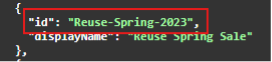
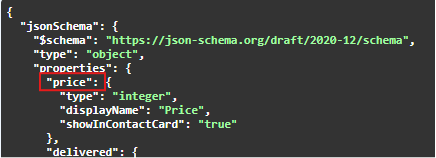
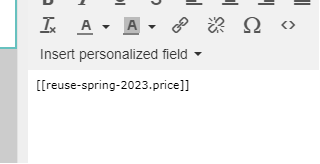
Interaction segmentation
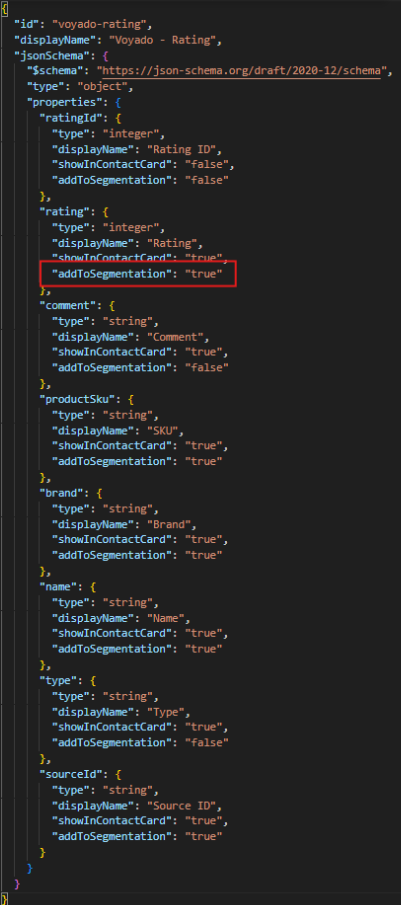
The propertyaddToSegmentation can be used in interaction schemas. Adding this property to one of your schema’s properties with a value of “true” makes the property show up in the filtering tool. You’ll then be able to segment for contacts with a certain value of that property.
If a property is not to be segmentable, you can either include addToSegmentation with a value of “false” or just leave it out entirely for that property.

Read a general introduction to interaction segmentation
- Boolean
- String (date is stored as a string)
- Integer
- Number
addToSegmentation in a schema:
Limitations
Some limitations are imposed on the use of interaction schemas with segmentable properties:- An Engage environment can have a maximum of 15 interaction schemas in total
-
A schema can contain a maximum of 6 segmentable propties. Validation exists to enforce this. For example, you can’t have an interaction with 6 segmentable properties of type “Number”, then 6 more of type “String”. In the example image above, every property has
addToSegmentationbut it is only “true” for 6 of them so only these will be segmentable.
Upgrading
There is no direct way to update an existing interaction schema to use the newaddToSegmentation functionality while still keeping the same schema name / ID. And when an interaction schema is deleted, all interactions associated with it are also removed, as well as all data displayed in the contact card or available for segmentation. This happens automatically.
So if you want to leverage addToSegmentation and retain old interactions for a certain interaction schema, there are two ways:
1 - Create a new schema using the same interaction structure
1 - Create a new schema using the same interaction structure
You’ll create a new schema that is identical to the existing one, the only difference being that some properties will now have the
addToSegmentation property with a value of “true”. It will need a different name, and it’s good if this name is connected to the original schema’s name.For example, if the original schema is called “Repairs”, create a new scheme with a name such as “Repairs-segmentable” with exactly the same structure and properties, the only difference being that some of the properties will now have the property addToSegmentationset to “true”. Now segmentation will be possible for the new schema (“Repairs-segmentable”).The segmentation UI in Engage will display all the properties you’ve marked as filtering options / fields for that schema. Segmentation for the old schema (“Repairs”) will just allow you to access the number of interactions received for a specified date range (which is the original behavior).2 - Delete original schema and re-import interactions
2 - Delete original schema and re-import interactions
If the source system retains historical interactions OR if you are able to fetch all the interactions from Engage prior to deletion of that schema using the relevant API endpoints, you have the option to delete all interactions and re-import them into an upgraded schema.Follow these steps:
Recreate the schema
Recreate the schema you deleted using
addToSegmentation (as “true”) added to the properties you want to be able to segment on.