


Open API site (Swagger UI) for API information
API overview
These links will take you to sections in this article or to other articles.Base URL
Authentication
Rate limit
Retry policy
Security
Versioning strategy
Non-functional requirements
Integration principles
Base URL
Voyado’s APIs are accessed through a single base URL, made up of the client’s name followed by “voyado.com”. For your production environment the base URL form is:Production URL
Staging URL
Naming convention
In this documentation, the part of the URL that comes before /api will be left out and the HTTP method will be added before it. For example, instead of an instruction to make a GET request to:Authentication
The API key provides you access to the Voyado Engage API. As with all keys, it needs to be handled carefully so it doesn’t fall into the wrong hands.Authorization method
The authorization methodapikey is used, as part of a HTTPS header.
User Agent
In order to track where an API call comes from, and which version the customer is using, the “User-Agent” request header must be used in all calls made to the Engage API. This provides valuable data to Voyado, improving service and allowing better support if problems occurs. “User-Agent” is set as a HTTPS header in the API-call, stating the system and which version of the integration the customer has. For example, if the client Acme is using a POS called “Acme-POS” with version 1.5, the “User-Agent” value in the request should be something like “AcmePOS/1.5”.Content-type
In all request made to the Engage API, it’s mandatory to use “Content-Type: application/json”. This needs to be sent in the HTTPS header in the API-call. If it’s not included, Engage will return a 500-error with the message “An error has occurred”.Example in cURL
Rate limit
In order to maintain a high quality of service throughout the system, Voyado recommends that you keep the frequency of your requests to the Voyado Engage API below 50 per second under normal operation. If you exceed the rate limit of 200 requests per second, the API will return a HTTP-status code 429 Too Many Requests.Going above the API limit recommendations for more than a few seconds can cause degradation in Voyado’s services.
Retry policy
As a user of the Voyado Engage API, you must always ensure that, after sending a request, your solution waits for the response to arrive. If a response is delayed, you should not perform a retry before you know the reason for the delay. If your response is late, it is more probable that Engage is under an unusually high load and responding slowly than your message was lost along the way. Messages can be lost, of course, but it is not the most likely scenario. According to the Voyado Engage integration principles, a contact should always be able to perform their entire purchase in the POS or e-com, regardless of problems such as the Engage API not responding. The internet is complex and many things can go wrong or be delayed. So if your flow is time-critical, you should be prepared to handle all likely interruptions on your end, and not be entirely dependent on ideal-case response times from Engage.Timeouts
Engage’s general stance is that delays are beneficial. The platform is designed to prioritize successful execution over speed, particularly to avoid data corruption. As such, most API endpoints are configured with long timeouts; this gives clients the best chance of receiving a response without prematurely failing the request. It is therefore not recommended that customers enforce their own timeouts. However, in critical flows, such as Create Contact, where the API interaction is tied directly to customer-facing experiences (e.g. onboarding confirmations), there is a need for quicker client feedback. In these specific cases, Engage may proactively return a timeout with a shorter interval, using the status code “504 RequestTimeOut”.Retrying
If a retry is unavoidable, here are a few things to keep in mind: In general, a retry should be made as late as possible based on your particular scenario. Shorter retry intervals can make the problem worse, increasing the possibility of writing incorrect data, as well as the load on the system. But it also depends on what you’re doing. For example, a job started by a server or process on another system can wait increasingly long intervals between retries (10s, 30s, 60s, 300s, etc.) whereas an action invoked by a user (such as a call from POS, e-com or the web) can get away with a shorter wait before a retry is made. But, again, wait as long as possible before retrying. POST requests change the state of the system every time they are called. So retrying a POST request without knowing if the first one went through can be very dangerous. It’s always wise, when retrying a POST, to:- Wait as long as your particular scenario allows
- Check using a GET if your previous request went through or not
- Try another POST, at increasing intervals
Jitter
It can be a good idea to add some jitter when performing retries. Jitter is some randomness added to your retry schedule so that every client is not calling the system at the same time, reducing performance. For example, if your retry schedule is the following:- Retry Immediately
- Then after 5 seconds
- Then after 5 minutes
- Then after 30 minutes
Read more about jitter
Security
For the majority of customers, interacting with the Voyado API is central to their solution, enabling them to create, read, update and delete information in multiple contact’s journeys simultaneously. As a Voyado customer, you can freely access your data in real time. However, this comes with certain risks, since that information could possibly end up in the wrong hands. To mitigate these risks it’s imperative that all users of the Voyado API do their best to handle their traffic in the most secure way possible. This section will list the basic measures that all API users should implement.API key in query string
The usage of an API key in the query string of an incoming request is NOT considered safe. Such a request is not strictly a security issue in itself, provided encrypted traffic is used. The problem is that the request, on its way from point A and point B, is most likely logged by the servers handling the traffic. The whole query string will then be visible in those logs, making them a potential security issue. API keys, because of this, should not be used in the query string but only in the header of the request.Encryption of data
Users of the Voyado API must adhere to common practices regarding encryption of traffic. We adhere to Mozilla’s definition of Intermediate Compatibility.Read more about Intermediate Compatibility
TLS
Starting October 1, 2025, Voyado will only support TLS 1.2 or higher. The older standards, TLS 1.0 and TLS 1.1, are considered insecure and will no longer be accepted. Any requests using non-supported TLS versions will be denied.IP filtering with API keys
It is possible to restrict access to the Voyado API for a specific API key using IP-filtering. This measure, set up by Voyado, limits access to traffic coming from specific IP addresses or ranges of IP addresses, greatly reducing the risk for leakage of data. In the case of an API key becoming compromised, an attacker would then also need access to a device/service communicating through the correct IPs to gain access to the data, providing an extra layer of security. The API key on its own is not enough to provide access.Recommended ciphers
- ECDHE-RSA-AES128-GCM-SHA256
- ECDHE-ECDSA-AES256-GCM-SHA384
- ECDHE-RSA-AES256-GCM-SHA384
- ECDHE-ECDSA-CHACHA20-POLY1305
- ECDHE-RSA-CHACHA20-POLY1305
- DHE-RSA-AES128-GCM-SHA256
- DHE-RSA-AES256-GCM-SHA384
Versioning strategy
API versioning is the practice of managing changes to an API and ensuring these changes are made without disrupting clients. A good API versioning strategy clearly communicates the changes made and allows API consumers to upgrade to the latest version at their own pace. Voyado’s API versioning model for Engage is designed to enable their developer teams to release new and changed functionality that extends the API in a controlled way. The new model gives Voyado’s client`s developers (both partner and in-house) improved and updated documentation, including well-defined release notes for all changes to the API. The model ensures that Voyado’s client developers (both partner and in-house) always get updated documentation, including well-defined release notes for all changes to the API.The Engage API today
- The current version of Engage API is version 3
- All versions of the API can be used independently
- A common API versioning scheme is used for all endpoints
- Major version upgrades are done when breaking changes are needed (see below)
- Minor non-breaking changes are done regularly
- V1 is considered deprecated but can still be used
Definition of changes
The definition of what is a breaking and a non-breaking change is vital in understanding the Engage API versioning strategy. The following are examples of non-breaking changes:- Adding an optional field to a request message. Existing client code will not be forced to use the new field.
- Adding a required field with a default value to a request message. The server will add the default value if the client does not send it.
- Adding a field to a response message. Existing client code should ignore any such new fields. Clients should not implement a mapping that raises an error for new fields.
- Renaming fields or resource paths in a way that requires client code to change.
- Renaming or removing fields in a request or response message.
- Removing API operations used by existing clients of the API.
- Changing fields from single value to multiple value (like from a single email per member to a list of email addresses).
- Changing the HTTP method or the response codes returned by an API operation.
The API versioning vision
The Engage API should be reliable, scalable and easy to use, providing clients with real-time access to their core CXM environment. There are four key goals:1 - Adapt to business requirements
1 - Adapt to business requirements
Voyado’s developers must be able to release new or changed endpoints to production whenever they are ready. This will work like this:
- Non-breaking changes will be developed and released continuously to production by Voyado’s teams following the normal release process.
- Breaking changes (that trigger a new version) will also be released continuously but will be hidden behind a feature toggle.
- Breaking changes should be collected into official releases, ensuring consistent communication both externally and internally.
- First-mover clients may be selected to use pre-released API functionality before official releases, although with limited support.
2 - Backward compatibility
2 - Backward compatibility
To ensure backward compatibility:
- Voyado will not force clients to upgrade their API version, and will avoid impacting working integrations by keeping multiple supported versions in parallel.
- Voyado will warn well in advance before moving a version to an unsupported end-of-life state, giving clients time to upgrade.
- Voyado will deprecate versions in a controlled manner, and have a dialogue with clients still using unsupported version to help them upgrade.
3 - Keep API documentation up-to-date
3 - Keep API documentation up-to-date
Voyado will ensure clear communication and up-to-date documentation.
- New versions with breaking changes will require all related API documentation to be updated and clear release notes to be communicated both externally and internally.
- Minor non-breaking releases will also require changes to API documentation as well as clear release notes.
4 - Be transparent and consistent
4 - Be transparent and consistent
Voyado will be as transparent and consistent as possible with API roadmaps and release notes.
- Voyado will publish and communicate the new API versioning model externally to partners and clients.
- Voyado will communicate the new API version strategy and versioning model to all Voyado departments.
- Voyado will train their dev teams to use the new API versioning model.
API release status
These are the lifecycle phases for an API version: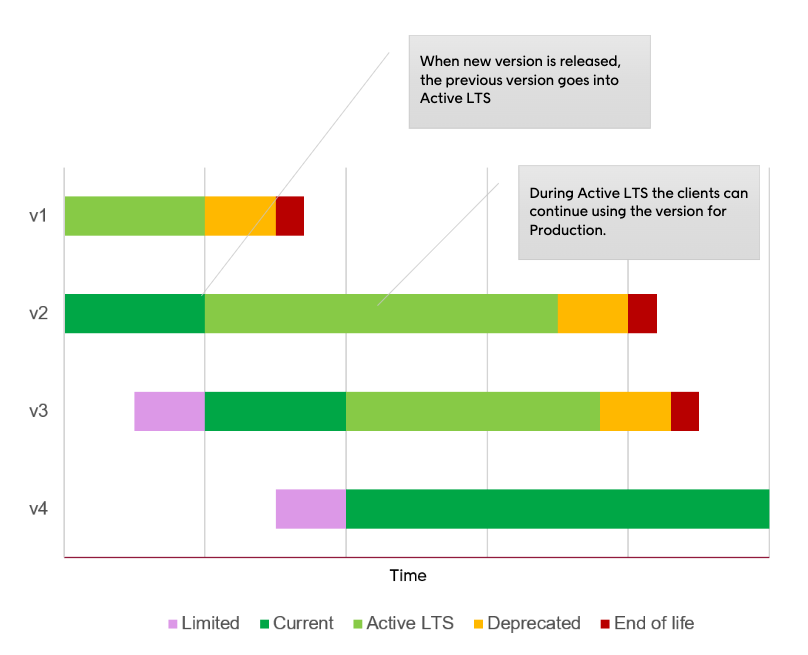
Strategy in a nutshell
These are the important points of the Engage API versioning strategy:- Versioning will be separated on an application level (Engage, Elevate Storefront, Elevate Admin).
- A single version will be used for all Engage API endpoints.
- A new API version will be released when breaking changes are introduced.
- An old API version will be supported for at least 18 months.
- Non-breaking changes will be automatically applied to the latest version.