


versionTag before using that to trigger an action. As processing time may vary, it is critical to have a retry mechanism in place that polls the status until a valid versionTag is returned.
The endpoint used is:
orderId of the order in question. The payload looks like this:
You determine what is in this string.
Sent back when Engage has successfully processed the latest update to your order.
Whatever else you need the automation trigger to have access to.
Response codes
If the action has been accepted, you’ll get a HTTP 202 Request has been accepted response. Otherwise, one of these:- 400: Bad request
- 404: Order not found or VersionTag did not match the order
- 422: Order has no contact
Data flow
Here you can see the data flow for orders and order communication: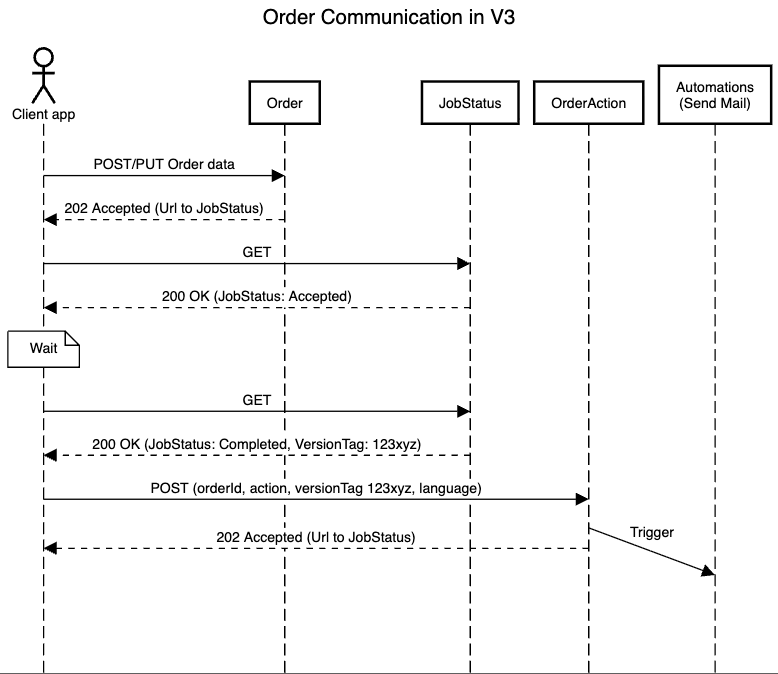
Order actions
These are the individual order actions a merchant can use to trigger events in Engage:ConfirmOrder
ConfirmOrder
When the order is confirmed.The merchant verifies and confirms that the order is legit and confirms that payment has been received. This assures the customer that their transaction was successful.
ConfirmShipment
ConfirmShipment
When the order is shipped.The order has been handed over to a delivery service and is on its way to the customer. The customer will usually receive a tracking number to get updates on their package.
ConfirmDelivery
ConfirmDelivery
When the order has been delivered.The package has been successfully delivered to the customer’s address. The merchant might want to alert the customer about the delivery.
ConfirmCancellation
ConfirmCancellation
When the order has been cancelled.The order has been canceled either by the customer or the merchant due to some reason (such as out of stock or payment issues).
ConfirmCompletion
ConfirmCompletion
When the order has been completed.The order has been shipped/picked up, receipt is confirmed. Or the client has paid for a digital product, and their purchase is available for download.
Custom
Custom
When a custom order action is requested.